




On this page
cPanel is an account-level web hosting interface used to manage website files, domains, email, databases and SSL-related settings. It is not the hosting service or the server operating system: your provider supplies the infrastructure, while WHM and root access cover server-level administration.
This guide separates those responsibilities, explains how a website account works, and shows where WordPress, PHP, React and Node.js applications fit.
What cPanel Is and What It Is Used For
cPanel is a web-based control panel for a single hosting account. You use it to manage the web-facing parts of that account rather than the underlying server as a whole.
cPanel is the account-level interface used to manage domains, email accounts, website content, SQL databases and other web services. This is useful when you need routine website administration without logging in as the server administrator.
Common account-level tasks
Typical cPanel work includes adding a domain, uploading site files, creating a database and database user, creating mailbox addresses, reviewing DNS records and managing account-level SSL/TLS settings. File Manager lets an account owner upload, edit and delete website files on the server, while Email Accounts lets an account owner create, manage and delete email accounts.
cPanel is not your website software. WordPress is an application that can run in a hosting account; cPanel is one interface you may use to prepare the domain, files, database, email and certificate around it.
Why available tools vary by plan
Two accounts that both use cPanel may not expose the same menus. A hosting provider can enable or disable individual cPanel features through WHM’s Feature Manager, so the account plan and server configuration determine which tools you can use.
The Boundary Between cPanel, WHM and Your Hosting Provider
Think of cPanel as the account layer and WHM as the server-management layer. The provider operates the physical or virtual infrastructure and decides the service design, while an authorised administrator configures the server software.
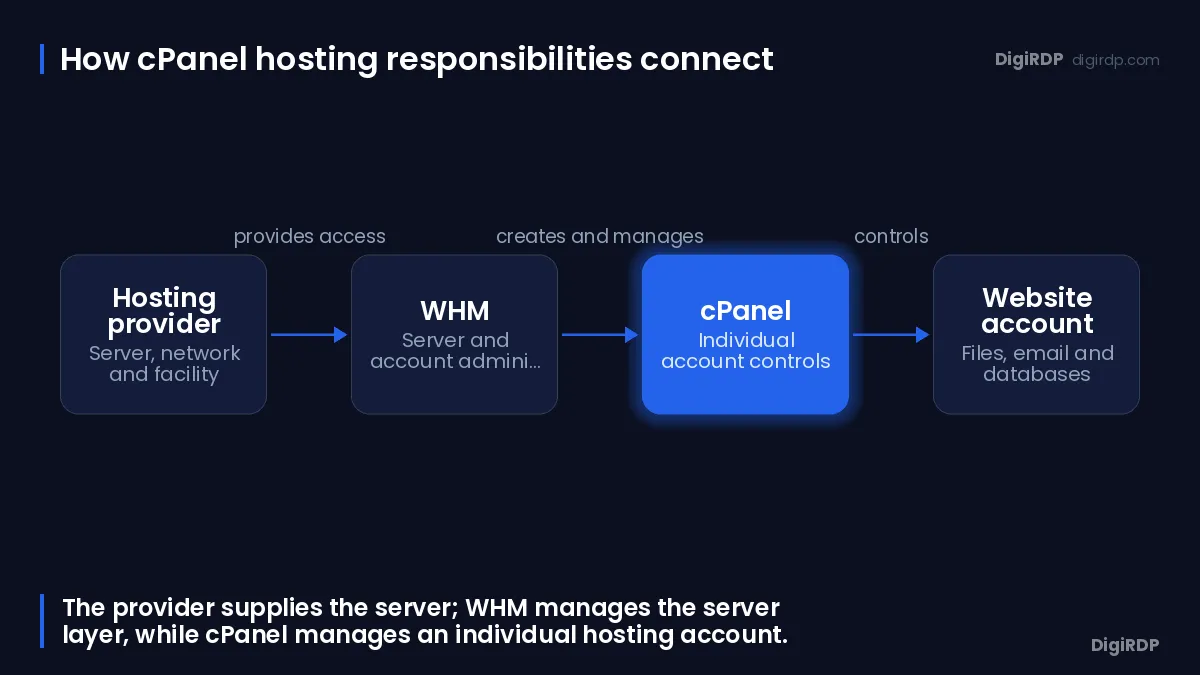
WHM is the server-administration interface that provides the root user and authorised resellers with server-level management features. A related guide is available on Web hosting.
What WHM controls
WHM is used to create and manage hosting accounts, apply package limits, manage server services and configure server-wide settings. WHM also provides server-level SSL/TLS configuration and AutoSSL management, whereas cPanel provides account-level SSL/TLS controls.
Scheduled backup configuration is also a server-level concern: WHM’s Backup Configuration controls scheduled backups for selected cPanel account files and system files. Do not assume an account has a particular backup schedule until you have confirmed the plan and server configuration.
What requires root or reseller access
A cPanel user can manage most aspects of a website, while the root user can create or modify any account and access all cPanel and WHM features. WHM access requires the root user or a user with reseller privileges, so an ordinary cPanel account does not automatically provide server-administrator access.
Installing server packages, changing operating-system configuration, setting global security policy and installing cPanel itself are root-level tasks. A reseller can have selected WHM permissions without having unrestricted root access.
What the provider decides
Your provider decides the available operating system, server capacity, network configuration, licence arrangement, account limits and which cPanel features are enabled. It may also manage part or all of the server administration, depending on the service you select.
AutoSSL can automatically install domain-validated certificates for supported web, mail, Web Disk and cPanel services when the server configuration permits it. Automatic certificate handling therefore depends on the server setup, not merely on seeing an SSL menu in an account.
How cPanel Hosting Works for a Website Account
cPanel hosting usually starts with an account provisioned on a server that already runs the control panel. You sign in, attach or create the domain configuration, publish site content, connect any database, create required mailboxes and confirm that DNS and TLS settings match the site.
Signing in to cPanel, WHM and webmail
The standard secure cPanel login uses the server IP address or domain name with port 2083, while secure WHM access uses port 2087. Webmail can be accessed directly through the server IP address or domain name with secure port 2096.
Use the hostname, URL and credentials supplied for your own service. Resolve a valid certificate warning or login failure using the service details from your provider rather than entering credentials into an unfamiliar address.
Domains and DNS records
DNS connects a domain name to the services that answer for it. The Zone Editor lets an account create, edit and delete DNS records such as A, CNAME and MX records when the provider has enabled the feature.
An A record normally directs a hostname to an IP address, a CNAME creates an alias, and MX records direct mail delivery. Changing DNS at the wrong authority will have no effect, so first establish whether DNS is managed in cPanel or elsewhere.
Files, databases, email and SSL
For a conventional site, publish the application files in the document root associated with the domain, then enter the database credentials in the application configuration if the site uses a database. Keep database users limited to the permissions the application needs, and protect control-panel credentials as administrative credentials.
Before publishing, check the domain’s document root, database name, database user, mail records and certificate status. SSL/TLS encrypts the connection between a visitor and the website when the certificate and web-server configuration are in place.
WordPress, PHP, React and Node.js: What cPanel Can Host
cPanel can support several website types, but it does not make every application compatible by itself. The site’s runtime, server packages and account features determine the practical deployment path.
Conventional PHP and WordPress sites
WordPress is a PHP application that normally uses a database. In a suitable cPanel account, you can manage its domain, files, database and account-level settings through the panel; WordPress itself remains the application used to edit posts, pages, themes and plugins.
The difference between cPanel and WordPress hosting is therefore not a contest between two substitutes. cPanel is the administration interface, while WordPress hosting describes a service intended to run the WordPress application.
Deploying a static React build
A React project can produce a static build made of files that a web server can deliver. A static JavaScript build can be deployed as static files, while a server-side Node.js application requires a running application process managed through cPanel’s Node.js tooling.
For a static build, the key question is the correct output directory and document root. You do not need a persistent Node.js process merely to serve already-built HTML, CSS, JavaScript and asset files.
When a Node.js application needs server control
For Node.js applications, cPanel documentation requires root-level access for server installation and a functioning package manager. In the current Websites hub, Node.js deployment requires the Web Apps feature, and Node.js appears only when the hosting provider enables it.
A cPanel-hosted Node.js application also depends on the required Node.js and web-server packages being installed. The provider controls the maximum number of applications that can be added to an account, so confirm the available feature and account limit before choosing a plan.
Choosing Shared Hosting, a VPS or a Dedicated Server
Select the service model by the control you need, not simply by whether you want cPanel. A website account is usually sufficient for standard site administration; a VPS or dedicated server becomes relevant when you need to administer the operating system, install server software or control WHM at server level.
When a website account is enough
Choose an account-level hosting service when your work is limited to website files, domains, databases, mailboxes and the tools the plan already provides. You can review the current options on cPanel Shared Hosting.
This model reduces server-administration work, but it also means you cannot assume permission to install packages, alter global web-server configuration or create other hosting accounts.
When WHM and root access matter
Consider a VPS or dedicated server when you need to install and license cPanel and WHM, create multiple cPanel accounts, configure server-wide services or run workloads that need operating-system administration. You can assess the available VPS options on our linux vps hosting.
Root access adds responsibility: you need to maintain the operating system, apply security updates, configure services, plan backups and keep the application stack compatible with the control panel.
cPanel licensing and operating-system fit
cPanel and WHM require a paid licence for normal operation, although a new installation can use a 15-day trial licence without charge during initial configuration. cPanel and WHM are server software rather than a hosting provider, because the software must be installed on and licensed for a separate server.
Official cPanel system requirements list AlmaLinux, CloudLinux, Rocky Linux and Ubuntu as supported operating-system families for cPanel and WHM. Confirm the exact operating-system release, architecture, licence and management responsibilities before you order a server or start an installation.
Dedicated Server Fit for cPanel Administration
A dedicated server can suit administrators who require root-level control and want to run WHM and multiple cPanel accounts, but cPanel is not implied by the server hardware alone. Confirm cPanel licensing, operating-system compatibility and management responsibilities before ordering.
The table below matches different cPanel administration requirements to DigiRDP dedicated plans.
| Requirement | Plan | vCPU | RAM | Storage | Location | Setup time | Price (USD, live) |
|---|---|---|---|---|---|---|---|
| Single busy site or app | USA dedicated #3 | Logical cores: 8 @ 2.5Ghz | 16 GB DDR3 | Disk: 1TB HDD | Buffalo, New York | Setup time 24hr to upto 3days | $62.50/mo, billed annually ($750.00) |
| Several sites, databases and backups | Indian Dedicated #1 | 4 vCPU (8 vCPU) | 32 GB | 1TB HDD (upto 4) or SSD | Pune, MH / Mumbai, MH | Setup time 24hr to upto 3days | $158.33/mo, billed every 6 months ($950.00) |
| High-traffic or virtualised workloads | GT-710 Ryzen 9 Server | 12 vCPU (@3.80GHz) | 64 GB DDR4 | 1 TB NVMe | Europe | Setup time- 24 hours minimum | $199.00/mo |
| Storage-heavy or many tenants | Ryzen Master | Logical cores: 32@ 3.40 GHz | 128 GB DDR4 ECC | 2 x 1TB NVMe SSD | Germany | Setup time 24hr to upto 3days | $299.00/mo |
You can review the current dedicated-server options on Dedicated servers guide. Confirm the selected operating system, licence arrangement and any administration scope with the plan details before deployment.
Questions to settle before choosing a server
- Which supported operating system and version will run on the server?
- Who will install, license, secure and update cPanel and WHM?
- How many website accounts, domains, databases and mailboxes will the server need to support?
- What backup schedule, retention and restoration process will you operate?
- Does the intended application need only static-file delivery, PHP, or a managed Node.js process?
cPanel and Hosting Terms Glossary
These terms identify the interface, server layer and access level involved in a hosting setup.
| Term | Meaning |
|---|---|
| cPanel | An account-level interface for managing website and account services. |
| WHM | A server-administration interface for root users and authorised resellers. |
| Root user | The operating-system administrator with full server privileges. |
| Reseller | A user who may receive selected WHM permissions to manage hosting accounts. |
| Hosting provider | The organisation supplying the server infrastructure and service configuration. |
| Operating system | The server software layer on which cPanel, web services and applications run. |
| DNS | The naming system that maps domain names to service records. |
| SSL/TLS | Protocols and certificates used to encrypt website connections. |
| Static site | A site delivered as prebuilt files without a server-side application process for each request. |
| Node.js application | A server-side JavaScript application that needs an available runtime and application process. |
| AutoSSL | A server feature that can automatically install supported domain-validated certificates when configured to do so. |
Frequently Asked Questions
What is cPanel and why do I need it?
cPanel is an account-level interface for managing domains, email accounts, website content, SQL databases and other web services. You need it when you want a graphical way to administer those account-level website tasks without performing server-wide administration.
Is cPanel the same as hosting?
No. Hosting is the infrastructure and service that provides server resources; cPanel is software installed on a server to manage an account. cPanel and WHM require a separate server and a paid licence for normal operation.
Is cPanel hosting free?
cPanel and WHM require a paid licence for normal operation, although a new installation can use a 15-day trial licence without charge during initial configuration. Whether a hosting plan includes or separately charges for the licence depends on the service arrangement, so check the plan details.
Which is better, cPanel or WordPress?
They serve different purposes. cPanel manages hosting-account services such as files, domains, databases and email, while WordPress is the website application used to create and manage site content.
How do I log in to cPanel hosting?
Use the service URL and credentials supplied for your account. The standard secure cPanel login uses a server IP address or domain name with port 2083; use port 2087 for secure WHM access and port 2096 for secure webmail access when those services are available to you.
Can cPanel host a React app?
Yes, a static React build can be deployed as static files in an appropriate website document root. If the project is a server-side Node.js application, it needs a running application process and the required Node.js tooling enabled by the provider.
Sources
- Getting Started in cPanel | cPanel & WHM Documentation — docs.cpanel.net
- The WHM Interface | cPanel & WHM Documentation — docs.cpanel.net
- Create a New Account | cPanel & WHM Documentation — docs.cpanel.net
- How to Log in to Your Server or Account | cPanel & WHM Documentation — docs.cpanel.net
- Zone Editor | cPanel & WHM Documentation — docs.cpanel.net
- Guide to SSL | cPanel & WHM Documentation — docs.cpanel.net
- SSL-TLS | cPanel & WHM Documentation — docs.cpanel.net
- Backup Configuration | cPanel & WHM Documentation — docs.cpanel.net
Ready to deploy your own server?
Full admin access, DDoS protection and instant setup — pick a plan sized to your workload.
Explore Dedicated Servers