



On this page
Claude for Startups can provide eligible approved companies with Claude Team access, Claude API credits and programme resources, while Claude Code can work from a persistent project environment. A Linux VPS gives your automation jobs an always-available home over SSH; this guide separates the programme benefits from the server setup, security and operating choices involved.
You will learn what the current programme includes, how to apply, when a remote Linux environment is appropriate, and how to install and operate Claude Code with review gates.
Understand Claude for Startups Before You Deploy
What approved startups currently receive
Anthropic expanded Claude Startups in early October 2026 and the programme is open to applications. The benefits its programme page presents without qualification are the Claude Startup Stack — discounts and credits worth up to $45,000 from partner companies, redeemable in Claude Console — plus 45-minute Applied AI office hours held every other week, member-only events, hackathons and community meetups, and higher API rate limits for members who receive credits.
Two further benefits were widely reported when the programme expanded: a year of Claude Team for up to five Premium seats, and $1,000 in Claude API credits. Treat those as possible rather than promised. Anthropic’s own programme FAQ currently states: “We’ve received hundreds of thousands of applications over the past few days, and we’re currently over capacity on the Claude Team and $1,000 API credit offers.” It adds that anyone who already claimed the offer keeps it. Apply anyway — the Startup Stack, office hours and rate limits are not affected — but do not plan a runway around credits that Anthropic says are over capacity. The programme page is the live source of truth.
A company backed by a VC in Anthropic’s partner network may be eligible for additional API credits through that VC. Treat this as a separate possible benefit, not as the standard allocation.
Claude Team, API credits and Claude Code are different tools
Claude Team is a team product with seats. API credits apply to the first-party Claude API through Claude Console, not to third-party platforms. Claude Code is a coding product that can work across a codebase from natural-language instructions.
For a VPS workflow, distinguish interactive Claude Code use from an application or scheduled process that calls the API. Give each project only the credentials and file permissions it needs.
Limits, expiry and programme changes
Where credits are allocated, reporting at the time of the expansion put them at $1,000, claimed through the Startups page in Claude Console after acceptance, expiring six months after allocation and not usable through third-party platforms. Anthropic’s official programme terms do not name an amount or an expiry at all: they say selected awardees “may receive Anthropic API credits, priority rate limits, and/or access to certain resources”, that programme benefits are provided “as is”, and that Anthropic “reserves the right in its sole discretion to cancel, terminate, modify, or suspend the Program”. Members who do receive credits get higher API rate limits automatically.
Programme eligibility and benefits remain subject to Anthropic’s discretion, and Anthropic may cancel, terminate, modify or suspend the programme. Check the current programme page before making a budget or delivery commitment around credits.
Check Eligibility and Complete the Application
Who can apply without venture backing
The programme is open to bootstrapped, pre-seed and venture-backed startups, and Anthropic states that venture backing is not required. A recency rule — founded within the last five years, or funded within the last two — was widely reported when the programme expanded, but it does not appear in the official programme terms, so check the application itself rather than relying on it. The terms do set geographic restrictions and exclude Anthropic employees.
Information to prepare in Claude Console
You need a Claude Console account, a company email address matching the website domain, and a short description of the product. Anthropic may consider business traction, investment, funding, Claude integration and usage when evaluating an application.
Sign in to Claude Console and complete the startup application. Anthropic reviews every application individually and requires compliance with its supportability policies.
Review, notification and verification timing
Anthropic says most applications are decided within minutes; applications requiring manual review usually take two to three business days. Selected applicants are notified by email.
If requested, return verification documents within fourteen calendar days. The startup terms say that failing to complete requested verification can result in forfeiting programme benefits.
Decide Whether a Linux VPS Fits the Automation
Why a server can be better than a laptop
A remote Linux environment is useful when a repository, logs and a terminal session need to remain available after your local computer disconnects. It is most suitable for bounded work: a defined repository, a non-privileged account, explicit inputs and human review before deployment.
Do not treat a remote coding session as permission to make unattended production changes. Keep infrastructure changes, credential rotation, database operations and releases behind an approval step.
Linux VPS versus Windows RDP
Linux and Windows can both provide a remote working environment, but the day-to-day control path differs. The comparison below helps you choose an operating model rather than assuming virtual-machine support status.
| Consideration | Linux VPS | Windows RDP |
|---|---|---|
| Primary access | SSH terminal | Remote desktop session |
| Persistence approach | Terminal multiplexer and log files | Desktop session plus application logs |
| Suitable Claude Code workflow | Repository-led command-line work and repeatable shell tasks | GUI-led work or Windows-specific local tooling |
| Operational overhead | Shell, permissions, updates and log rotation | Desktop administration, updates and GUI session management |
| Prefer it when | Your work is terminal-centred and can be reviewed through version control | Your workflow depends on Windows-only tools or visual desktop interaction |
For a GUI-led or Windows-specific workflow, assess a Windows remote desktop environment on Windows RDP plans options.
Workloads that should stay supervised
Keep any task that can alter production systems, spend API credit unexpectedly, expose customer data or change access controls supervised. Start with a read-only repository task, a test branch and a capped scope before you schedule repeated runs.
Choose Capacity and a Suitable VPS Plan
Conservative CPU, RAM and NVMe sizing
Anthropic’s official Claude Code documentation lists installation paths for macOS, Linux and Windows but does not specify minimum CPU, RAM or disk requirements. The sizing below is therefore a conservative operational starting point, not an Anthropic hardware requirement.
For one light repository task, begin with 1 vCore, 2 GB RAM and enough disk for the operating system, repository, dependencies and retained logs. For moderate work with builds or tests, use 2 vCores and 3 GB RAM; for concurrent sessions or heavier local builds, start at 3 to 4 vCores and 4 to 6 GB RAM. Monitor memory pressure, disk use and task duration, then resize based on observed demand.
Location, remote access and backup considerations
Choose a location that gives your operators practical SSH responsiveness and keep a separate copy of source code and essential configuration outside the server. A VPS is a working environment, not the only copy of a repository or deployment record.
The table below matches conservative Claude Code automation workloads and operational requirements to DigiRDP VPS plan options.
| Requirement | Plan | vCPU | RAM | Storage | Location | Setup time | Pricing |
|---|---|---|---|---|---|---|---|
| Single small project or service | Cloud VPS Host IPV6 | 1 vCPU | 1 GB | 10 GB disk (RAID 50) | USA- New York | Instant Setup or Up to 12hrs | See plan page |
| Builds, tests and a few containers | Cloud VPS Host Plus | 1 vCPU | 2 GB | 20 GB disk (RAID 50) | USA- New York | Instant Setup or Up to 12hrs | See plan page |
| Larger repos, databases or several agents | Cloud VPS Host Pro | 3 vCPU | 4 GB | 40 GB disk (RAID 50) | USA- New York | Instant Setup or Up to 12hrs | See plan page |
| Heavy builds, CI or many concurrent workloads | Cloud VPS Host Deluxe | 4 vCPU | 6 GB | 60 GB disk (RAID 50) | USA- New York | Instant Setup or Up to 12hrs | See plan page |
Review the current capacity options and locations on Cloud VPS plans options. If you want a Linux operating environment for a terminal-led setup, compare the available options on Linux VPS environment.
How to choose without relying on vendor minimums
Choose for the heaviest approved task rather than the shortest prompt: dependency installation, test execution, repository size, retained logs and parallel sessions all consume capacity. Run one supervised project first, record peak memory and disk consumption, then increase capacity only when measurements show a constraint.
Install Claude Code and Prepare an Isolated Project
Use a dedicated non-production project directory and a normal user account. The official Claude Code documentation supplies no VPS minimum CPU, RAM or disk specification, so the sizing guidance above is deliberately conservative rather than a vendor requirement.
Connect with an SSH key and update the host
From your local terminal, connect with the SSH username and server address issued for your VPS.
ssh your-user@your-server-address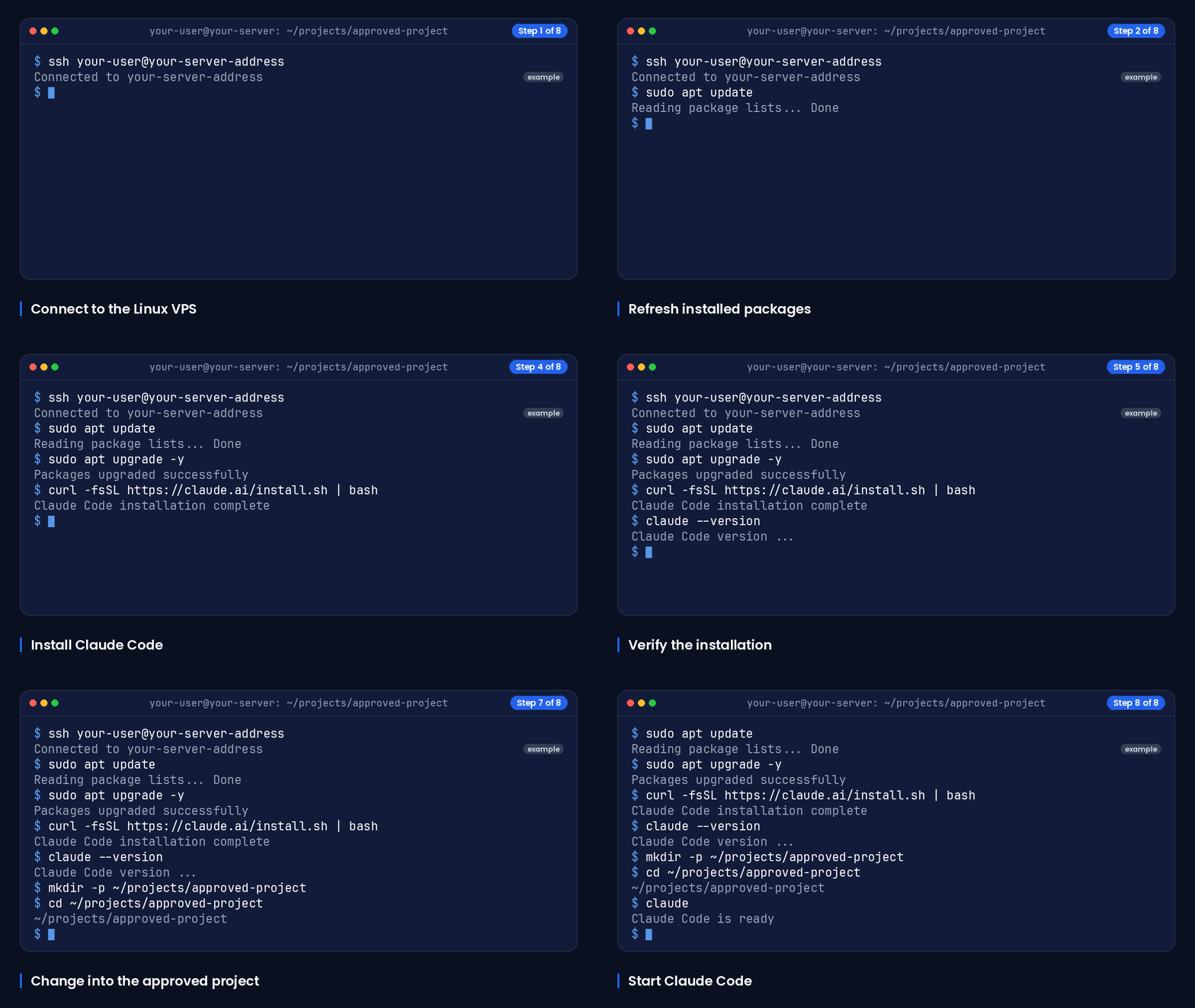
On a Debian or Ubuntu host, update installed packages before installing development tools.
sudo apt update
sudo apt upgrade -y
If this is your first Linux server, use the practical server-access guidance available through Windows RDP vs Linux VPS — Which Should You Pick before exposing project services or changing remote-access settings.
Install the official Claude Code client
The official Claude Code repository recommends its native installer for macOS and Linux, and says that npm installation is deprecated. Run the native installer from the account that will use Claude Code.
curl -fsSL https://claude.ai/install.sh | bashOpen a new shell if the installer asks you to reload your environment, then verify that the command is available.
claude --versionKeep credentials and project files separate
Create a directory owned by the working user, then move into it before cloning or creating a repository. Do not put access keys, tokens or copied production configuration into version-controlled project files.
mkdir -p ~/projects/approved-project
cd ~/projects/approved-project
The official instructions say to enter the project directory and run claude. Complete authentication only in the client’s approved sign-in flow, and confirm which repository and branch are open before asking it to make changes.
claudeKeep Automation Sessions Running Safely
Use tmux for persistent terminal sessions
A tmux session keeps its shell available when your SSH connection drops. Create a named session before starting work.
tmux new -s claude-work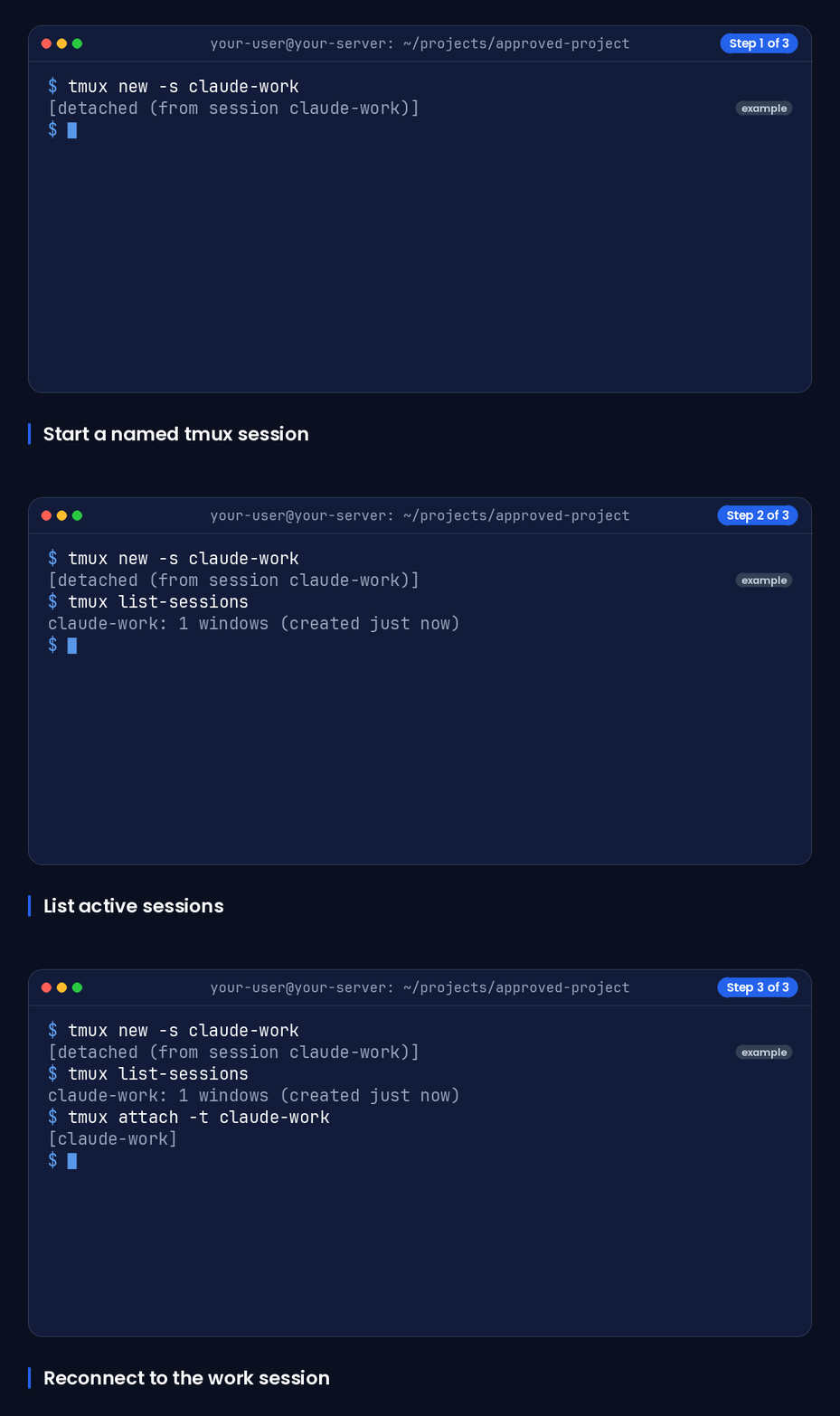
Detach with Ctrl-b followed by d. When you reconnect, list sessions and reattach to the named session.
tmux list-sessions
tmux attach -t claude-work
Use environment variables and least privilege
Run Claude Code as a normal project user, not as the system administrator. Restrict that user to the intended repository and working directories, and use narrowly scoped credentials that can be replaced if needed.
Keep secrets out of shell history, prompts, logs and source control. Where a task needs an API credential, load it through your approved secret-handling method for that process rather than placing the value in a repository file.
Review changes, logs and API usage
Use a branch for proposed changes, inspect the diff, run relevant tests and require human approval before merging or deploying. Record the command output needed to investigate failures, but redact tokens and personal or customer data.
For repeated activity involving project files and logs, you can review SSD-backed VPS options on developer VPS options. Set a routine to review API usage and credit balance, especially because startup API credits expire six months after grant.
Frequently Asked Questions
What is the Claude for Startups programme?
It is Anthropic’s programme for eligible startups. The current offer can include Claude Team access, Claude API credits, partner offers, office hours and startup events for approved companies.
What do you actually get from Claude for Startups right now?
Reliably: the Claude Startup Stack, worth up to $45,000 in partner discounts and credits, 45-minute Applied AI office hours every other week, member events and hackathons, and higher API rate limits for members receiving credits. Less reliably right now: a year of Claude Team for up to five Premium seats and $1,000 in API credits, both of which Anthropic’s programme FAQ currently describes as over capacity. Startups backed by a VC in Anthropic’s partner network may also be eligible for up to $100,000 in additional API credits, claimed through that VC.
Who is eligible for Claude for Startups, and is VC backing required?
VC backing is not required: Anthropic says the programme is open to bootstrapped, pre-seed and venture-backed startups. The current offer requires a startup founded in the last five years or funded in the last two, subject to Anthropic’s review and discretion.
How do you apply, and how long does review take?
Sign in to Claude Console and submit the startup application with a company-domain email and product description. Anthropic says most decisions arrive within minutes, while manual review usually takes two to three business days.
How do I set up Claude Code on a Linux VPS, step by step?
Connect over SSH, update the host, run the official native installer, create and enter a dedicated project directory, then run claude and complete its approved authentication flow. Use a normal user account and keep tokens outside the repository.
How can I keep Claude Code running after I disconnect from SSH?
Start the work inside a named tmux session, detach with Ctrl-b then d, and later reconnect with tmux attach -t claude-work. Review the session output and repository diff before acting on any proposed changes.
Sources
- Claude for Startups program | Claude by Anthropic — claude.com
- Startup Program Official Terms \ Anthropic — www.anthropic.com
- tmux(1) - OpenBSD manual pages — man.openbsd.org
Ready to deploy your own server?
Full admin access, DDoS protection and instant setup — pick a plan sized to your workload.
Explore Cloud VPS plans