




On this page
A Germany VPS is a virtual private server hosted in Germany. The best location is the one that gives your users, applications and administrators the most consistent measured network performance. A German location label is a useful starting point, but route quality, ISP, jitter and packet loss can matter more than the label alone.
This guide explains how to compare endpoints from important user networks, interpret the results, and match the outcome to Windows RDP, websites, APIs and administration work.
What a Germany VPS Location Actually Tells You
A Germany VPS location identifies the country in which the server is hosted. It does not, by itself, describe the exact route your connection will take or the response time a particular user will experience.
Germany VPS versus Shared Hosting and Remote Desktops
A virtual private server is an isolated virtual server environment for running your operating system and applications. Shared hosting is designed around a shared web-hosting environment, while a remote desktop is the interactive connection method used to control a Windows server. You can use a Germany VPS for server workloads and RDP when you need a graphical Windows administration session.
Why Physical Location and Network Route Are Different
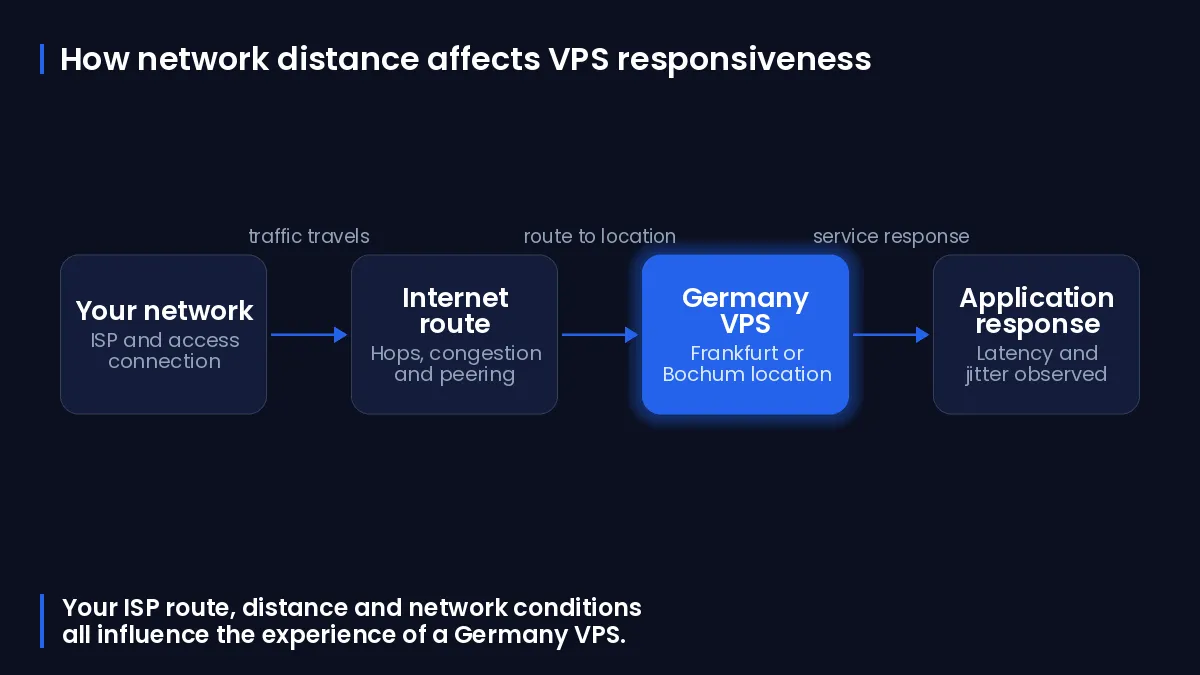
Your traffic travels through networks between your device and the server. Network congestion, link quality and the distance between hops can affect latency, so a German city label alone cannot determine the latency you experience.
Common Misconceptions About Germany Location Choices
No Germany location is automatically the better choice for every connection. A route that performs well from one office, home broadband line or mobile network can perform differently from another, even when both users are in the same country.
How Latency, Jitter and Routing Affect Your Experience
Latency is the time a packet takes to travel between points on a network. For selection work, record round-trip time in milliseconds, then assess consistency rather than relying on a single low result.
Latency versus Application Response Time
Round-trip time is a rough approximation of network transit time, not a complete measurement of application performance. Server processing, database calls, browser rendering and the application protocol can add delay beyond the network measurement.
Why a Lower Ping Is Not Always the Better Result
A one-off lower ping can be less useful than a slightly higher but stable result. Jitter is variation in latency over time, and high jitter can make real-time applications such as remote desktops behave inconsistently. Check median latency, the worst samples and packet loss across repeated tests.
When Route Changes Can Affect Performance
Peering is a direct exchange of traffic between networks; it can shorten network paths and reduce latency. Routes can also change over time, so keep the test record and repeat it if an important workload starts to feel different.
How to Make the Germany Location Choice
First confirm the available Germany location, then compare reachable endpoints from the networks your important users actually use. You can review DigiRDP location information on Data centres before beginning those tests.
The table below lists DigiRDP Germany data-centre location information.
| Location | Country |
|---|---|
| Germany | Germany |
When a Small City-to-City Difference Matters
A small difference can matter for an interactive Windows session when it is consistent and accompanied by low jitter and low packet loss. It normally matters less for a background task that does not require frequent user input.
When Provider Routing Matters More Than City
Compare the complete path rather than assuming geography decides performance. Traceroute results show the hop path and round-trip time from one measurement point, while the actual ISP and networks between that point and the server influence the result.
Choosing for Distributed Users
Run the same comparison from representative networks for each important user group. Choose the endpoint that meets the workload requirement for the users who matter most, and document any trade-off rather than selecting a location solely because it is closer on a map.
Measure Germany VPS Latency from Your Real Network
Test from the actual office, home broadband or mobile connection used for important work. A measurement from a different network does not necessarily represent the route taken by your users.
The following workflow creates a repeatable comparison for each candidate endpoint.
- Record the date and time, ISP, access type, user region, Windows version and tool version before testing.
- Run route tests to every candidate endpoint, then save the output with the recorded context.
- Repeat the samples at different times of day and compare median latency, worst result, jitter, packet loss and route changes.
- For a website or API, add an HTTPS check to the real hostname or test path; ICMP results alone may not reflect application traffic.
Record the Test Context Before Comparing Results
Create a folder for the test records before you begin.
mkdir C:\Germany-VPS-tests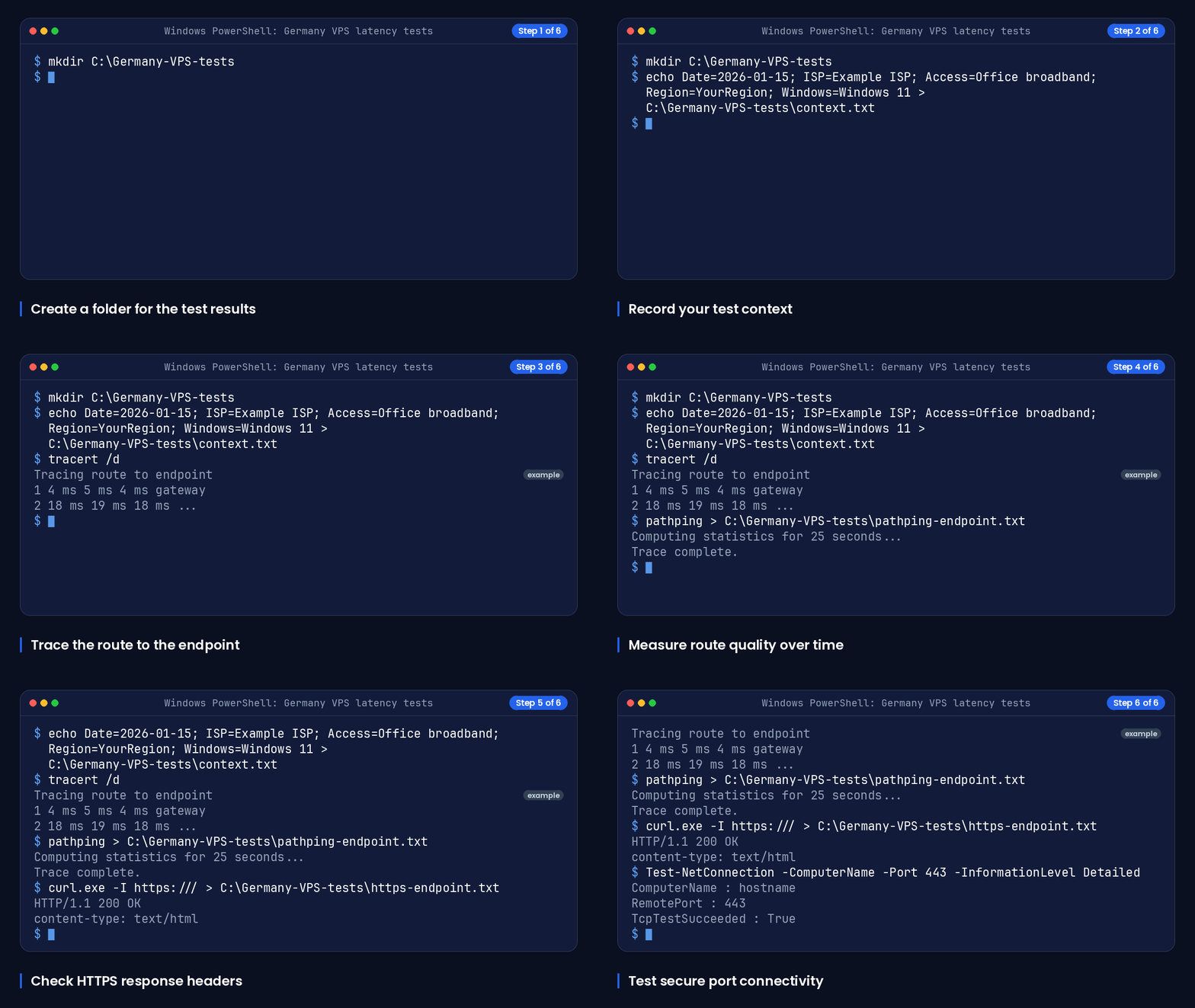
Write the test context into a dated note, replacing the sample values with your own details.
echo Date=2026-01-15; ISP=Example ISP; Access=Office broadband; Region=YourRegion; Windows=Windows 11 > C:\Germany-VPS-tests\context.txtUse tracert and pathping to Inspect the Route
Windows tracert reveals the hop-by-hop route from your device to a destination and reports round-trip time for each responding router. The /d option skips reverse-DNS resolution for intermediate routers, which can speed up the result.
Run this route trace for each endpoint, replacing the sample name.
tracert /d <endpoint>Windows pathping combines route information with latency and packet-loss measurements for routers and links on the path. Save its output so that repeated tests can be compared.
pathping <endpoint> > C:\Germany-VPS-tests\pathping-endpoint.txtTest the Real Protocol for Websites and APIs
For a website or API, test the actual HTTPS hostname as well as the route. Application-level checks are more representative than ICMP alone because they measure traffic of the same application type.
Run an HTTPS header request and save the response details.
curl.exe -I https://<hostname>/ > C:\Germany-VPS-tests\https-endpoint.txtFor a basic TCP reachability check to HTTPS, run the following command.
Test-NetConnection -ComputerName <hostname> -Port 443 -InformationLevel DetailedFor further connection and setup guidance, see Windows RDP versus Linux VPS guidance.
How to Interpret Timeouts and Inconsistent Hops
Asterisks in a tracert result do not automatically prove packet loss. Some routers do not return expired-TTL messages or can filter diagnostic probes, so compare the final destination result and repeated samples before drawing a conclusion.
Keep an endpoint only if it is reachable for the required protocol and its repeated results are acceptable for the workload. A failing route test is a reason to investigate, not proof that every application request will fail.
Match a Germany VPS to the Workload
Different workloads expose different bottlenecks. Match the plan category to the operating system, compute, memory, storage and management needs, then use measurements from the users and dependent services that will actually connect.
Windows RDP and Remote Administration
For Windows RDP, prioritise low and stable round-trip time, low jitter and low packet loss because these measurements affect interactive responsiveness. Review the current Windows remote-desktop options and specifications on Germany Windows RDP.
Websites, APIs and Databases
For websites and APIs, test the HTTPS endpoint from user regions and measure the path between the application server and each database or dependent service. Laptop-to-VPS latency alone does not describe the latency between application components. Review current cloud VPS options and specifications on Germany Cloud VPS.
Development and Multi-Region Teams
For development and administration across regions, collect comparable samples from each important team network. Select for the agreed priority: interactive administration, user-facing request time, or latency to a dependent system.
After verifying current specifications and Germany location availability on the relevant plan page, the table below compares workload and management requirements with suitable DigiRDP plan categories.
| Requirement | Plan | vCPU | RAM | Storage | Location | Setup time | Price (EUR, live) |
|---|---|---|---|---|---|---|---|
| Entry in UK-NL-US-Germany | Ryzen Private RDP #1 | 1 vCPU | 1 GB DDR4/DDR5 | 25 GB NVMe | UK-NL-US-Germany | Instant Setup or Up to 12hrs | €5.52/mo, billed annually (€66.20) |
| Standard in Location- Germany | Germany Cloud VPS #2 | 1 vCPU | 2 GB | 20 GB NVMe | Location- Germany | Instant Setup or Up to 12hrs | See plan page |
| Performance in Location- Germany | Germany Managed Cloud VPS #3 | 3 vCPU | 4 GB | 40 GB NVMe | Location- Germany | Instant Setup or Up to 12hrs | See plan page |
| High-memory in UK-NL-US-Germany | Ryzen Private RDP #6 | 6 vCPU | 8 GB DDR4/DDR5 | 120 GB NVMe | UK-NL-US-Germany | Instant Setup or Up to 12hrs | €23.47/mo, billed annually (€281.63) |
Germany Hosting and GDPR: What Location Does Not Solve
Hosting in Germany does not by itself establish GDPR compliance. You still need to identify whether your organisation acts as a controller or processor, assess privacy risks, and implement suitable security and governance measures.
Controller and Processor Responsibilities
A controller determines the purposes and means of processing personal data. A processor handles personal data on behalf of a controller. GDPR responsibilities apply to both roles, so server location does not remove your own compliance duties.
Security, Retention and Breach-Handling Considerations
Your assessment should consider data subject rights, breach handling, retention, security controls and whether high-risk processing requires a data protection impact assessment. Geographic hosting is one operational input, not a substitute for these decisions and controls.
When to Seek Compliance Advice
Seek qualified legal or data-protection advice when your processing is high risk, regulated, cross-border, or unclear. For a related operational perspective, visit Germany managed cloud VPS guide.
The glossary below defines the network and compliance terms used in this guide.
| Term | Meaning |
|---|---|
| Latency | The delay in network communication between points. |
| Round-trip time | The measured time for a packet to travel to a destination and for a response to return, usually shown in milliseconds. |
| Jitter | Variation in latency over time. |
| Packet loss | Packets that do not reach their destination or do not produce a response during a measurement. |
| Traceroute | A diagnostic that shows the network hops toward a destination; Windows uses the tracert command. |
| Peering | A direct traffic exchange arrangement between networks. |
| Endpoint | The hostname or IP address being tested or reached by an application. |
| Controller | An organisation that determines the purposes and means of personal-data processing. |
| Processor | An organisation that processes personal data on behalf of a controller. |
Frequently Asked Questions
Which Germany VPS Location Is Best for Distributed Users?
There is no single best German location for all networks. Test each available endpoint from representative user connections, then compare repeated median latency, worst samples, jitter, packet loss and protocol reachability.
Does One Germany Location Provide Lower Latency Than Another?
Not necessarily. Congestion, link quality, distance between hops and the route selected by the networks involved can affect round-trip time, so test the candidate endpoints from your own connection.
How Should You Measure Latency Before Choosing a Germany VPS Location?
Record the network context, use tracert /d and pathping for each endpoint, repeat at different times, and test the real HTTPS hostname where relevant. Compare medians, worst results, jitter, packet loss and route changes rather than one ping result.
Is a Germany VPS Suitable for Websites, APIs and Remote Desktops?
It can be suitable when the current plan specifications, operating system, location availability and measured network performance fit the workload. Websites and APIs need application-level checks, while remote desktops benefit from stable round-trip time, low jitter and low packet loss.
Does Hosting in Germany Automatically Make an Application GDPR Compliant?
No. Location alone does not establish GDPR compliance; controllers and processors still need to assess privacy risks, security, retention, data subject rights and breach-handling obligations. Compare DigiRDP services and resources on knowledge base resources when you need to review the available options.
Sources
- tracert | Microsoft Learn — learn.microsoft.com
- RFC 5388: Traceroute Storage Format — www.rfc-editor.org
- RFC 4710 — www.rfc-editor.org
- General Data Protection Regulation - Microsoft GDPR | Microsoft Learn — learn.microsoft.com
- Test-NetConnection (NetTCPIP) | Microsoft Learn — learn.microsoft.com
Ready to deploy your own server?
Full admin access, DDoS protection and instant setup — pick a plan sized to your workload.
Explore Windows RDP plans