



On this page
Latency in trading is the time taken for information or an order-related action to travel between defined points, usually measured in milliseconds. A trading VPS can affect the terminal-to-broker network segment and the resources available to MT4 or MT5, but a low ping does not measure the broker’s complete processing and confirmation cycle or predict trading results.
This guide separates the stages in a latency measurement, explains RTT and repeated tests, and shows how to investigate network, VPS and terminal-load issues.
Trading Latency Defined
Trading latency means elapsed time between defined events. Those events might be an EA generating an instruction, the terminal sending a request, a network response arriving, or a broker confirmation appearing in the terminal. Define the start and end points before comparing any number.
Milliseconds are one thousandths of a second. They are a useful unit for network timing, but a latency figure without its measurement method and endpoints has limited meaning.
Low latency trading meaning
Low latency trading means reducing measured delay between specified points, such as a VPS and a broker trade-server address. It does not mean every stage of an application workflow has the same delay, because terminal work, network travel, remote processing and the return path are separate stages.
Is higher or lower latency better?
For the same endpoints and test method, a lower measured delay means less elapsed time for that measured path. Consistency also matters: frequent spikes can be more useful to investigate than a single low result.
Latency versus trading outcomes
Latency is an infrastructure measurement, not a measure of execution quality or a prediction of a trading outcome. A ping result cannot show the full application request, broker processing and confirmation cycle.
The Path From MT4 or MT5 to the Broker
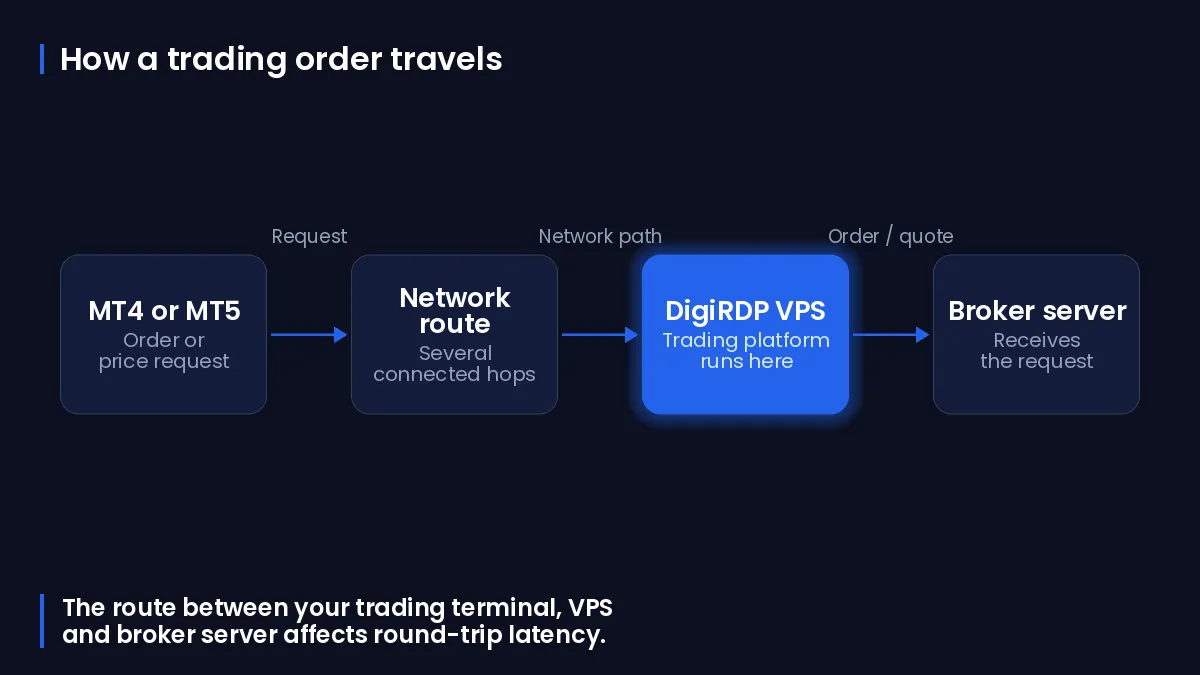
Think of an order-related action as a sequence rather than one number. A manual action or EA first requires the terminal to process local work; the terminal then uses its network connection, and a response returns after remote handling.
Terminal and EA decision time
Before a network request leaves the VPS, MT4 or MT5 may be processing charts, indicators, EA logic, logs and other terminal activity. If the terminal is busy, this local stage can delay visible activity even where network RTT remains stable.
VPS-to-broker network path
The network segment begins when the terminal sends traffic from the VPS and ends when a response returns. Forward and return paths can differ, so a round-trip measurement combines conditions from two paths rather than providing a direct one-way reading.
Broker processing and return confirmation
After traffic reaches the remote side, application processing and the return confirmation add further stages. An ICMP diagnostic response is therefore not the same measurement as a terminal confirmation.
RTT, Ping and Latency Reports
RTT, or round-trip time, measures delay from sending a packet until receiving the corresponding response. It includes both directions and endpoint processing for that packet exchange.
Is latency the same as RTT?
RTT is a type of latency measurement, but it is not identical to one-way latency. It combines the forward and return paths, which can have different routing and queueing conditions.
Reading minimum, average and spike values
Read a set of results together. The minimum observed RTT can indicate propagation and transmission delay on the measured path, while higher observations can indicate congestion or queueing during the test. An average describes the sample set; it does not remove the importance of isolated spikes.
Why one ping is not enough
One RTT sample is not enough to characterise a path because delay can change with congestion, cross-traffic, recovery procedures and route changes. Record repeated, recent samples during the periods that matter to your terminal workload.
VPS Setup Factors That Can Affect Trading Latency
VPS selection affects the segment you can control: the location and route between the deployed terminal and the broker trade-server, plus the compute resources available to the terminal. You can review VPS hosting options on our cloud vps plans.
Broker trade-server region and VPS location
Start with the broker trade-server address or region, then test candidate VPS locations to that destination. Geographic proximity can be a useful starting hypothesis, but it does not prove the route or its measured RTT; routing must be tested from the deployed VPS.
CPU, RAM, disk and shared-resource pressure
CPU, memory and disk pressure can slow local terminal activity without necessarily changing network RTT. Virtual machines share underlying processor, memory and I/O resources with other virtual machines on a host, so resource contention can affect application performance.
Charts, indicators and EA workload
More open charts, indicators, EAs and concurrent applications create more terminal work. Test the actual workload, observe CPU and memory during an issue, and change one factor at a time so that results remain interpretable.
Choose a DigiRDP VPS Location and Plan
Verify the broker trade-server region first, deploy in a candidate location, and test from that VPS over several periods. Use the current plan page to confirm specifications and availability before ordering.
Start with the broker server address
Obtain the trade-server hostname or IP address from the broker’s own terminal or documentation. Do not substitute a public website address: it may be served from a different network location and will not test the same destination.
Test from the deployed VPS
Use the same VPS that runs the terminal and retain the date, time zone, destination and results. For trading-focused options, see Best Forex VPS for 2026; MT4 users can review MetaTrader 4 VPS, and MT5 users can review MT5 VPS Hosting — Pre-Installed MetaTrader 5 with Multi-EA Support guide.
When to review resources instead of location
If RTT is stable but the terminal is slow, inspect the VPS workload before changing location. The table below matches terminal workload and administration requirements to available DigiRDP VPS options.
| Requirement | Plan | vCPU | RAM | Storage | Location | Setup time | Price (USD, live) |
|---|---|---|---|---|---|---|---|
| 1 platform, 1–2 charts, 1–2 EAs | Forex ADMIN RDP #1 | 2 vCPU (2.5–3.5 GHz) | 2 GB | 40 GB NVMe | UK/NL+12 | Instant Setup or Up to 12hrs | $12.50/mo, billed annually ($150.00) |
| 2–3 platforms or 5+ charts, several EAs | Forex ADMIN RDP #2 | 4 vCPU (2.5–3.5 GHz) | 4 GB | 80 GB NVMe | UK/NL+12 | Instant Setup or Up to 12hrs | $23.33/mo, billed annually ($280.00) |
| Many EAs, tick backtests, multiple brokers | Forex ADMIN RDP #3 | 2 vCPU (2.5–3.5 GHz) | 6 GB | 80 GB NVMe | UK/NL+12 | Instant Setup or Up to 12hrs | $83.25/mo, billed annually ($999.00) |
| Prop-firm scale: many terminals and indicators | New York Ryzen RDP #8 | 6 vCPU | 16 GB DDR4 | 200 GB NVMe | USA-New York | Instant Setup or Up to 12hrs | See plan page |
Use the broker trade-server region as the starting point, then use the relevant plan page for current specifications and availability.
Test and Troubleshoot a Latency Issue
Test from the VPS while the issue is reproducible where possible. Separate network-path evidence from terminal and Windows resource evidence so that a stable ping is not mistaken for proof that every application stage is healthy.
The table below maps common symptoms to the most useful evidence and Windows checks.
| Symptom | Likely stage | Evidence to collect | Windows tool | Next check |
|---|---|---|---|---|
| RTT changes or apparent packet loss | Network path | Repeated samples, destination, timestamps and hop results | tracert and pathping | Compare repeated runs; note that intermediate devices can limit diagnostic replies. |
| Stable ping but delayed terminal activity | Terminal or remote application stage | Terminal time, logs and concurrent workload | Task Manager | Reduce or isolate charts, indicators, EAs and other local work. |
| High CPU or memory use | VPS resource pressure | CPU, memory and process usage while the delay occurs | Task Manager or Performance Monitor | Identify the process and test the workload again. |
| Disk pressure or slow system response | Storage or paging | Disk and memory indicators recorded over time | Performance Monitor | Check storage, paging and the active processes separately. |
| Delay remains after VPS and terminal checks | Remote application or broker-side stage | Terminal timestamps, network tests and resource record | Terminal logs plus network tools | Provide the evidence record to the appropriate support channel. |
Collect repeated network-path samples
Replace TRADE-SERVER with the broker trade-server hostname or IP address. Start with repeated ICMP samples to establish a time-stamped baseline.
ping TRADE-SERVER -n 20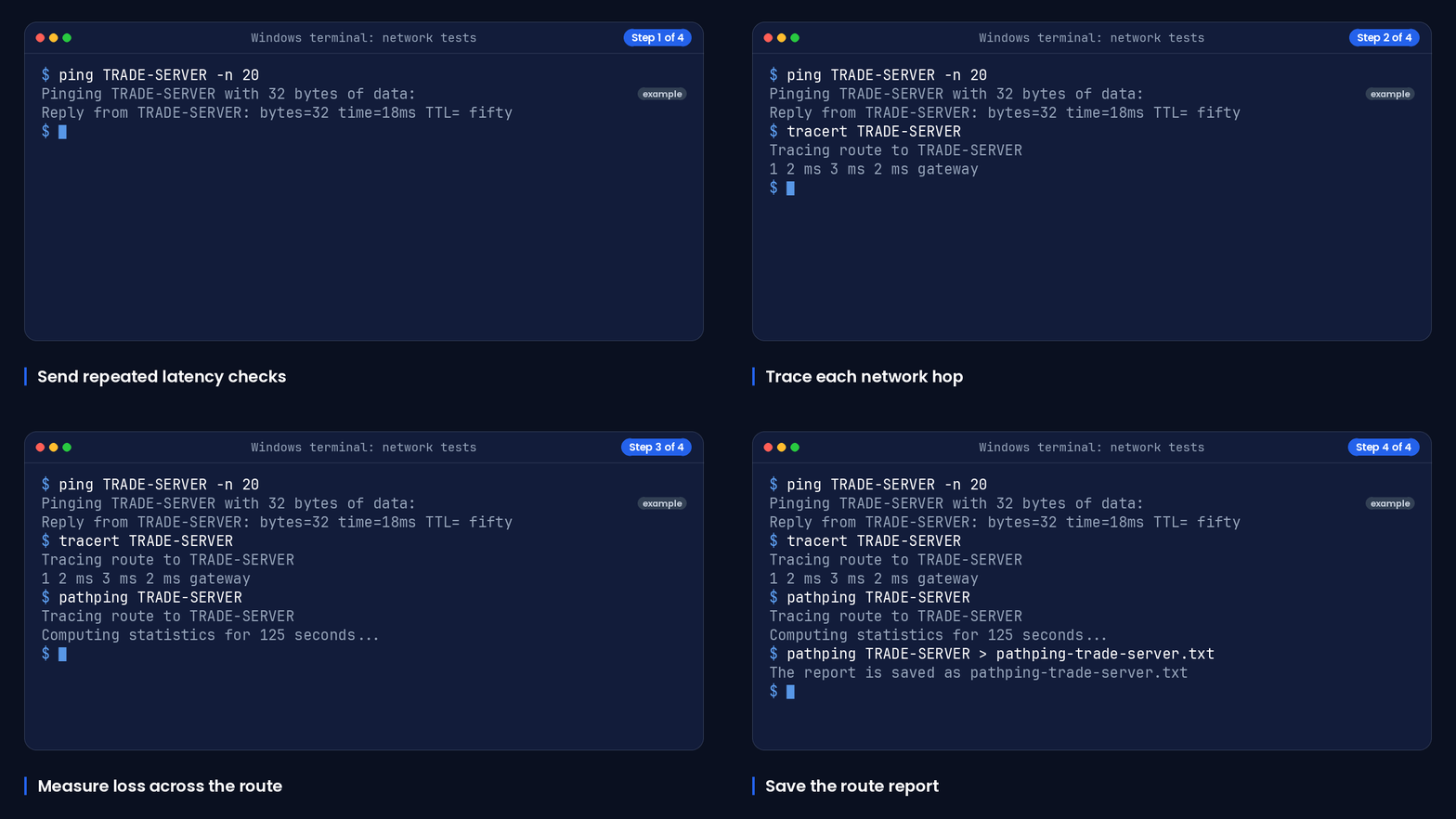
Run a route trace to see responding hops and their reported RTT values.
tracert TRADE-SERVERRun PathPing when you need repeated probes and latency and loss statistics across the path. It can take time to complete because it sends repeated probes.
pathping TRADE-SERVERSave the output with a timestamped filename so that you can compare runs from the same VPS.
pathping TRADE-SERVER > pathping-trade-server.txtWindows tracert reports the path to a destination and displays RTT in milliseconds for each responding hop. Windows pathping sends repeated probes and calculates latency and packet-loss statistics for intermediate hops and links.
Check CPU and memory during the issue
Open Task Manager while the terminal is delayed and record the relevant process, CPU use and memory use. Task Manager provides live views of application processes and system performance categories including CPU and memory usage.
For a longer record, open Performance Monitor and add processor, memory, disk, network and process counters that match the suspected bottleneck. Microsoft recommends separating slow-system investigation into memory, storage, CPU and network components.
Escalate with a useful evidence record
Include the VPS location, test destination, date and time zone, repeated ping output, route and PathPing output, terminal logs or timestamps, and CPU, memory and disk observations. This lets support distinguish a changing network path from terminal load or a stage outside the VPS.
For DigiRDP troubleshooting guidance, use low-latency Windows tuning.
Frequently Asked Questions
What is a good latency for trading?
There is no universal good number without defined endpoints, a test method and the broker trade-server being measured. Compare repeated results from the VPS to that destination and investigate variability as well as the minimum and average values.
How does RTT differ from one-way latency?
RTT is a round-trip latency measurement: it runs from sending a packet to receiving the response. It is not a direct one-way latency measurement because it combines the forward and return paths.
What is latency trading in forex?
In forex infrastructure, latency describes delay between defined stages such as terminal processing, network travel and a returned confirmation. It is not a measure of trading outcomes.
How should you compare higher and lower latency?
When you compare the same endpoints using the same method, lower measured delay means less time for that path. Also examine spikes and repeated samples rather than relying on one result.
What does a latency report mean?
A latency report is a record of measurements, usually including destination, timestamps and RTT values. Interpret it according to its tool: ping, tracert and pathping measure network-path responses, not the complete terminal and broker confirmation cycle.
Risk disclaimer: Trading forex, CFDs and other leveraged products carries a high level of risk and is not suitable for every investor; you can lose more than your initial deposit. This article is about server infrastructure only. It is not investment, trading or financial advice, and a VPS does not improve trading results or guarantee any outcome. Consider your objectives and experience and seek independent advice where appropriate.
Sources
- RFC 8238: Data Center Benchmarking Terminology — www.rfc-editor.org
- RFC 6077: Open Research Issues for Internet Congestion Control — www.rfc-editor.org
- RFC 2681: Round-trip for Delay Metric for IPPM — www.rfc-editor.org
- tracert | Microsoft Learn — learn.microsoft.com
- pathping | Microsoft Learn — learn.microsoft.com
- Troubleshoot processes by using Task Manager - Windows Server | Microsoft Learn — learn.microsoft.com
- Troubleshoot performance problems in Windows - Windows Server | Microsoft Learn — learn.microsoft.com
- Hyper-V processor performance | Microsoft Learn — learn.microsoft.com
Ready to deploy your own server?
Full admin access, DDoS protection and instant setup — pick a plan sized to your workload.
Explore Cloud VPS plans