



On this page
A VPS in trading is a remote virtual machine that can keep MetaTrader 4 or MetaTrader 5, Expert Advisors and signal-copying functions running when your local computer is offline. For copy trading across several brokers, choose a location using repeated latency checks to every relevant broker server and the path between sender and receiver terminals, not simply the city nearest to you.
This guide maps the copy-trading architecture, explains how to measure candidate locations, and covers session checks and fault isolation. It is technical infrastructure guidance, not trading advice.
What a VPS Does in Copy Trading
A conventional VPS gives you a remotely administered environment in which you can arrange terminals and copier components. You can review current VPS options on Cloud VPS plans.
Conventional Windows VPS versus MetaTrader virtual hosting
MetaTrader virtual hosting is a special virtual-terminal service operated through the platform vendor's hosting network, rather than a conventional interactive desktop VPS. That hosting service's rules also state that scheduled maintenance can occur and do not promise uninterrupted virtual-terminal operation.
MetaTrader virtual hosting lets you select a hosting server with low ping to the broker trade server before you migrate the environment. It can migrate Expert Advisors, indicators, signal-copying settings, or a complete environment according to the migration mode you select.
What stays running when your computer is offline
Once the terminal and copier have been installed, configured and kept connected on the remote environment, their operation does not depend on your local computer remaining online. Check terminal connection status and logs after every restart or configuration change.
What a VPS cannot determine
A VPS does not select accounts, signals, order settings or risk limits for you. Infrastructure can help you measure and reduce avoidable network path length, but it cannot determine trading results.
Map Your Master, Follower and Broker Connections
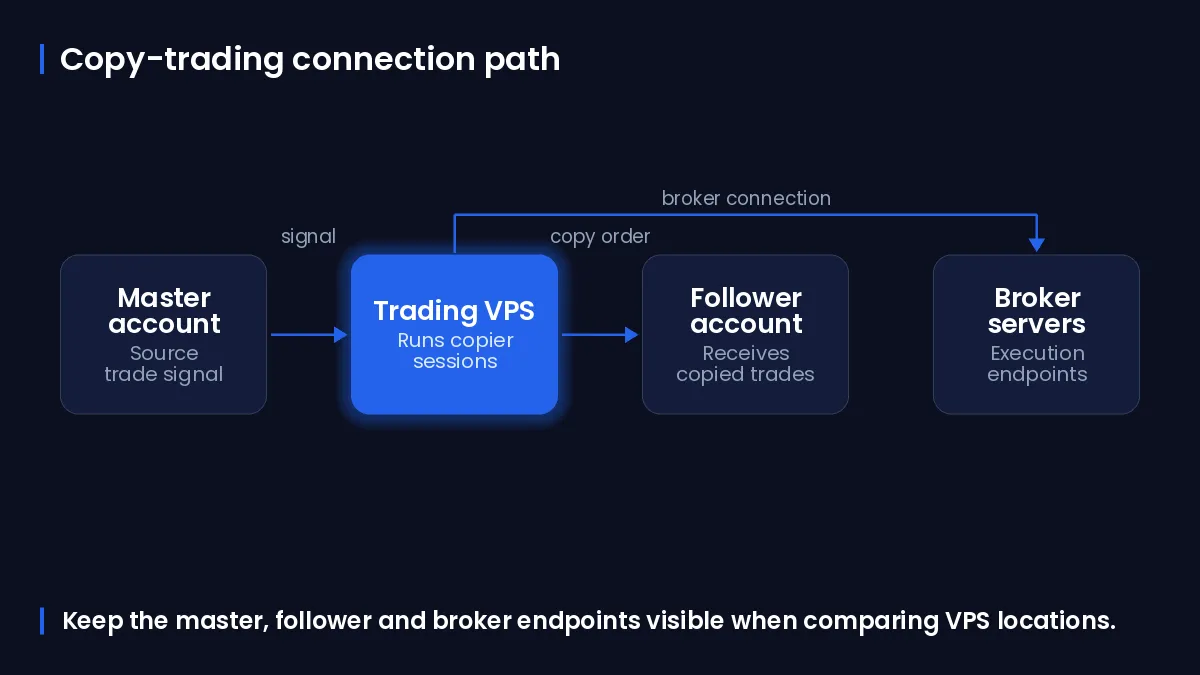
Map the actual connections before comparing locations. A diagram or worksheet should distinguish the sender terminal, every receiver terminal, every broker trade server, the copier communication route and the computer you use to administer the session.
Step 1: List each sender and receiver terminal
- Write down the platform version and account role for every running terminal: sender, receiver, or administration-only.
- Record the copier product or built-in signal-copying function used by each account.
- Record the charts, Expert Advisors, indicators and copier components that must remain open in each terminal.
Step 2: Record each broker server and account role
- Open each terminal and note the exact broker trade-server name displayed for the logged-in account.
- Associate that server name with its sender or receiver role in your worksheet.
- Keep demo and live accounts separate in the worksheet so that you test the correct endpoint for each terminal.
Step 3: Identify the copier path and your administration path
For every copied order, identify the route from sender terminal to copier component to receiver terminal, followed by each terminal’s separate connection to its own broker server. This prevents a location choice based on only one endpoint when several broker servers are involved.
Choose a Sender and Receiver Placement Model
Choose the simplest placement that meets the copier’s requirements, then validate that placement against every broker server. The city label is only a starting point; measured paths are the decision input.
One VPS for master and followers
Putting the sender and receiver terminals on one VPS can keep the copier components on the same local environment. Each terminal still needs a separately measured connection to its own broker trade server.
The table below compares common copy-trading placement models and the checks each model needs.
| Design | Copier path | Broker-server testing requirement | Interactive desktop access | Compatibility considerations |
|---|---|---|---|---|
| One VPS, colocated terminals | Sender and receivers share one remote environment. | Measure every terminal-to-broker-server path from that VPS. | Available where the selected VPS provides a desktop environment. | Confirm that the copier supports the required terminal count and account arrangement. |
| Separate VPS locations | The copier route crosses between remote environments. | Measure each terminal-to-broker path and the sender-to-receiver route. | Depends on each selected VPS environment. | Use only when measured results or operational requirements justify the additional path. |
| MetaTrader virtual hosting | The hosted virtual terminal runs the migrated environment. | Select and verify the hosting server against the broker trade server, then inspect hosting logs. | No conventional interactive desktop. | Migration and platform restrictions apply; test required components before relying on the design. |
Separate VPS locations for a distributed design
A distributed design adds a network segment between copier components. Use it only when repeated measurements support it or when a copier’s architecture requires it; measure both the inter-VPS route and every terminal-to-broker-server route.
Built-in MetaTrader hosting versus an interactive desktop
MetaTrader documentation states that DLL calls are forbidden in its hosted virtual terminal, and scripts are not transferred during virtual-host migration. An Expert Advisor or copier that needs DLL access, interactive desktop work or an external component should therefore be tested in a conventional desktop environment rather than assumed compatible with built-in hosting.
MetaTrader’s hosted service permits up to 32 charts for fee-based hosting and up to 16 charts for free hosting during migration. Those limits are specific to MetaTrader virtual hosting, not a sizing rule for a conventional VPS.
Measure Broker-Server Proximity Before Ordering
Build a shortlist, then gather repeated measurements under comparable conditions. Round-trip time can vary with congestion and other network conditions, so a single result is not a location decision.
Step 4: Build a location shortlist
Start with locations that can plausibly serve the set of broker servers you recorded, not merely your own physical location. You can inspect the available locations on available data centre locations and retain at least two candidates for comparison.
Step 5: Run repeated terminal and network measurements
First obtain each broker trade-server hostname from the relevant terminal. Run the following command on a candidate VPS after replacing broker-server.example with that hostname; repeat it for every broker server and record the timestamp and all returned times. Microsoft documents the Test-Connection cmdlet for connection testing.
Test-Connection -TargetName 'broker-server.example' -Count 10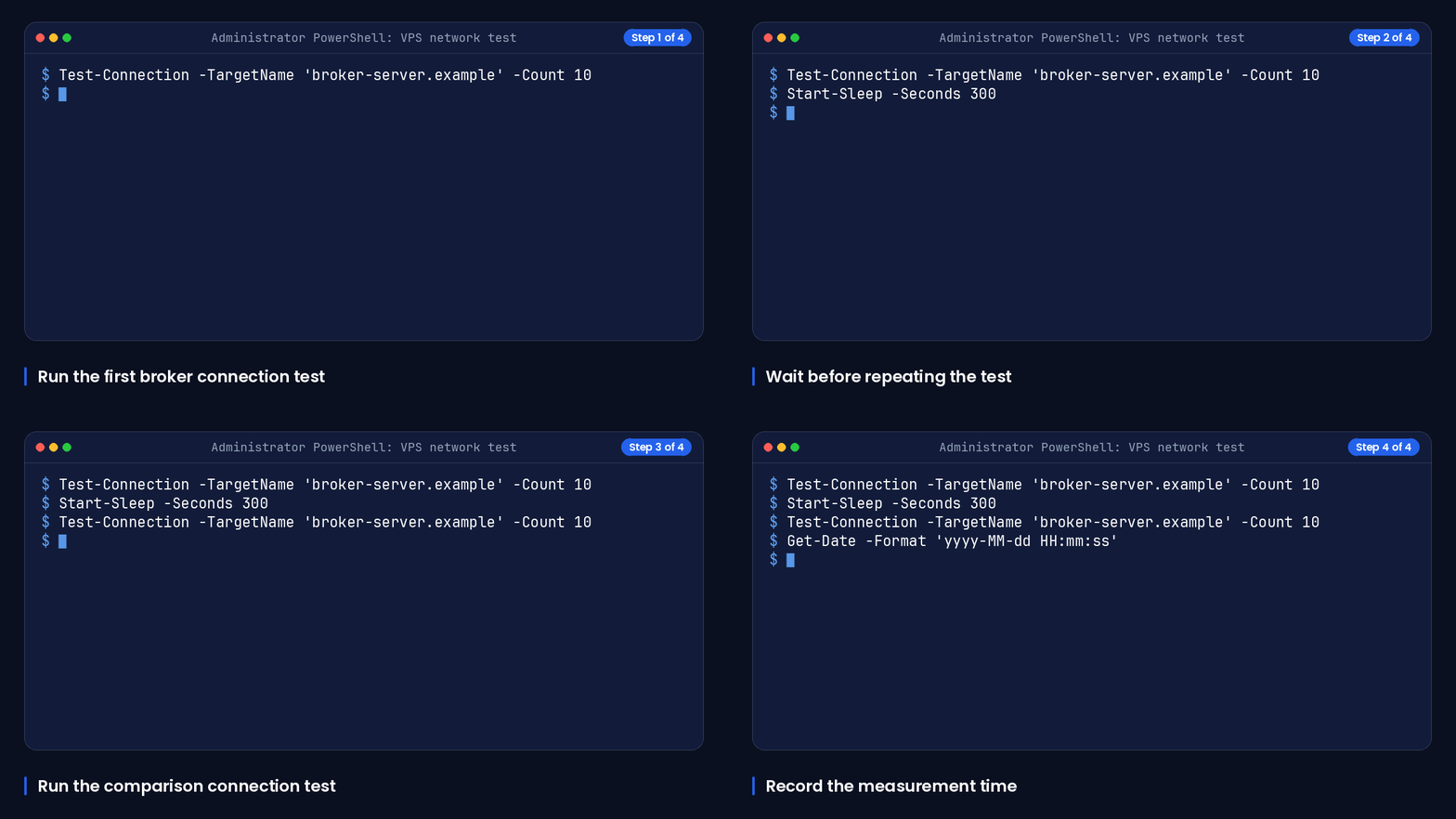
Wait five minutes before the next sample so that the results do not all reflect the same short network condition.
Start-Sleep -Seconds 300Run a second ten-sample measurement to compare with the first sample.
Test-Connection -TargetName 'broker-server.example' -Count 10Record the time and candidate label with the next sample so that you can compare locations and time windows consistently.
Get-Date -Format 'yyyy-MM-dd HH:mm:ss'Terminal ping information is the more relevant application view when it is available. ICMP results are useful as an initial comparison, but they may not represent the exact application path because some networks disable or handle ICMP differently from trading traffic.
Step 6: Score each location across all brokers
For each candidate, make one row per broker server. Record the lowest observed result, the typical result, the highest result and whether the terminal remained connected; then compare the whole set rather than choosing the lowest value for only the sender.
A practical comparison uses multiple samples and treats the lowest observed round-trip time as a baseline, while higher values may reflect buffering or congestion. Prefer the candidate with consistently suitable results across all required broker servers and a workable copier path.
How to interpret variable results
A high single result is a reason to collect more samples, not proof by itself that a location is unsuitable. Compare repeated samples taken at different times, look for disconnections in terminal logs, and distinguish a broker-server issue from a copier or local-session issue.
Select Capacity and Deploy the Trading Session
Count the terminals, charts, Expert Advisors, copier components and required Windows access before selecting a VPS. Compare that workload against the available DigiRDP VPS options rather than choosing from a location result alone.
The table below compares common copy-trading workloads with relevant DigiRDP VPS plan options.
| Requirement | Plan | vCPU | RAM | Storage | Location | Setup time | Price (USD, live) |
|---|---|---|---|---|---|---|---|
| 1 platform, 1–2 charts, 1–2 EAs | Forex ADMIN RDP #1 | 2 vCPU (2.5–3.5 GHz) | 2 GB | 40 GB NVMe | UK/NL+12 | Instant Setup or Up to 12hrs | $12.50/mo, billed annually ($150.00) |
| 2–3 platforms or 5+ charts, several EAs | Forex ADMIN RDP #2 | 4 vCPU (2.5–3.5 GHz) | 4 GB | 80 GB NVMe | UK/NL+12 | Instant Setup or Up to 12hrs | $23.33/mo, billed annually ($280.00) |
| Many EAs, tick backtests, multiple brokers | New York Ryzen RDP #6 | 6 vCPU | 8 GB DDR4 | 120 GB NVMe | USA-New York | Instant Setup or Up to 12hrs | $27.19/mo, billed annually ($326.30) |
| Prop-firm scale: many terminals and indicators | New York Ryzen RDP #8 | 6 vCPU | 16 GB DDR4 | 200 GB NVMe | USA-New York | Instant Setup or Up to 12hrs | $47.99/mo, billed annually ($575.90) |
You can compare VPS plans on Forex VPS hosting. If you use MetaTrader 4, review the relevant MT4 VPS Hosting; if you use MetaTrader 5, review the relevant MT5 VPS Hosting.
Step 7: Match terminal workload to a VPS plan
Choose capacity from the actual concurrent workload: terminal count, chart count, active Expert Advisors, copier components, logging and the operating system’s background use. Leave room to observe performance after deployment, then adjust only after measuring the live session.
Step 8: Install and arrange terminals
- Connect to the remote desktop provided with your selected service.
- Install each terminal from its broker or platform source, using a separate installation directory where the copier requires distinct instances.
- Log in to the intended sender and receiver accounts, confirm the displayed broker server for each one, and attach only the intended copier components.
- Keep a written mapping of installation directory, account role, broker server and copier role.
Step 9: Verify copying, logs and restart behaviour
Before relying on the arrangement, use a permitted test workflow to confirm that sender and receiver roles are mapped as intended. Check terminal journals and copier logs for connection, authorisation and copy events, then verify the same checks after a planned terminal restart.
For MetaTrader virtual hosting, the platform vendor states that the logs include trade operations, resource-use statistics and VPS management functions. Use those logs after migration to verify that the hosted environment contains the intended components.
Troubleshoot Latency, Copier and Session Problems
Diagnose in layers: broker connectivity first, copier communication second, then terminal operation and session persistence. Change one item at a time and retain the relevant terminal and copier logs for comparison.
The table below maps common symptoms to the component to isolate and the next technical check.
| Symptom | Likely layer to isolate | Next check | Corrective direction |
|---|---|---|---|
| High or inconsistent latency readings | Broker route or general network path | Repeat terminal and network measurements at different times for every broker server. | Compare candidates using the full set of samples, not one result. |
| Broker disconnections | Terminal-to-broker connection | Inspect the terminal journal for disconnect and reconnect entries and confirm the logged-in server. | Resolve the terminal connection issue before changing copier settings. |
| Missing copied trades | Copier configuration or account-role mapping | Verify sender and receiver roles, copier permissions, filters and copier logs. | Correct the mapping or supported copier setting, then retest with a permitted workflow. |
| Terminal does not resume as expected | Terminal startup or remote session configuration | Perform a planned restart and check the terminal, copier and operating-system startup sequence. | Fix the failed startup dependency and repeat the restart check. |
| DLL or interactive requirement does not work in virtual hosting | Hosting-platform compatibility | Confirm whether the component requires DLL access, scripts or interactive desktop activity. | Use a compatible conventional desktop environment after testing the component. |
High or inconsistent latency readings
Confirm that you tested from the candidate VPS rather than from your home or office connection. Then compare repeated terminal measurements for every broker server, using the same account role and platform instance each time.
Sender and receiver are connected but copying is delayed
Check the copier’s sender and receiver assignments first. Next, compare timestamps in the sender terminal, receiver terminal and copier logs; this shows whether delay occurs before the copier, within the copier route or after the receiver reaches its broker server.
Migration or automation does not work as expected
For MetaTrader virtual hosting, review the selected migration mode and hosting logs. The migration documentation states that a complete migration is needed when Expert Advisors or indicators and trade copying are to run together.
If a required component uses DLL calls, scripts or interactive desktop steps, check compatibility before migration. MetaTrader virtual hosting forbids DLL calls in the hosted virtual terminal.
For operational setup assistance, consult MT4 migration guide.
Frequently Asked Questions
Is copy trading illegal?
This guide cannot determine legality for your jurisdiction, broker agreement or platform arrangement. Check the applicable rules and the terms governing the accounts and copying service you use.
Which VPS is best for trading?
The appropriate VPS is the one whose measured location works consistently across every broker server in your design and whose capacity fits the terminals and components you actually run. Do not select by city label alone.
Is VPS good for trading?
A VPS can keep a configured terminal environment running while your local computer is offline. It does not determine trading results, account suitability or the behaviour of a signal provider.
Is copy trading actually profitable?
Infrastructure cannot answer that question. A VPS affects where and how reliably a configured terminal environment runs; it does not create or predict returns.
Can one copy trading VPS serve multiple brokers?
One VPS can host a sender and multiple receiver terminals when the copier, terminal arrangement and available capacity support that design. Measure the VPS-to-broker-server path for every broker, because each terminal has its own broker connection.
What is VPS-based copy trading?
VPS-based copy trading is a design in which the sender, receiver or both run on a remote virtual machine rather than on your local computer. The key technical checks are the copier path, each terminal’s broker-server connection, component compatibility and restart behaviour.
Risk disclaimer: Trading forex, CFDs and other leveraged products carries a high level of risk and is not suitable for every investor; you can lose more than your initial deposit. This article is about server infrastructure only. It is not investment, trading or financial advice, and a VPS does not improve trading results or guarantee any outcome. Consider your objectives and experience and seek independent advice where appropriate.
Sources
- RFC 6077: Open Research Issues in Internet Congestion Control | RFC Editor — www.rfc-editor.org
- RFC 6349: Framework for TCP Throughput Testing | RFC Editor — www.rfc-editor.org
- Test-Connection (Microsoft.PowerShell.Management) - PowerShell | Microsoft Learn — learn.microsoft.com
Ready to deploy your own server?
Full admin access, DDoS protection and instant setup — pick a plan sized to your workload.
Explore Cloud VPS plans